Message Statistics

Quick Answer
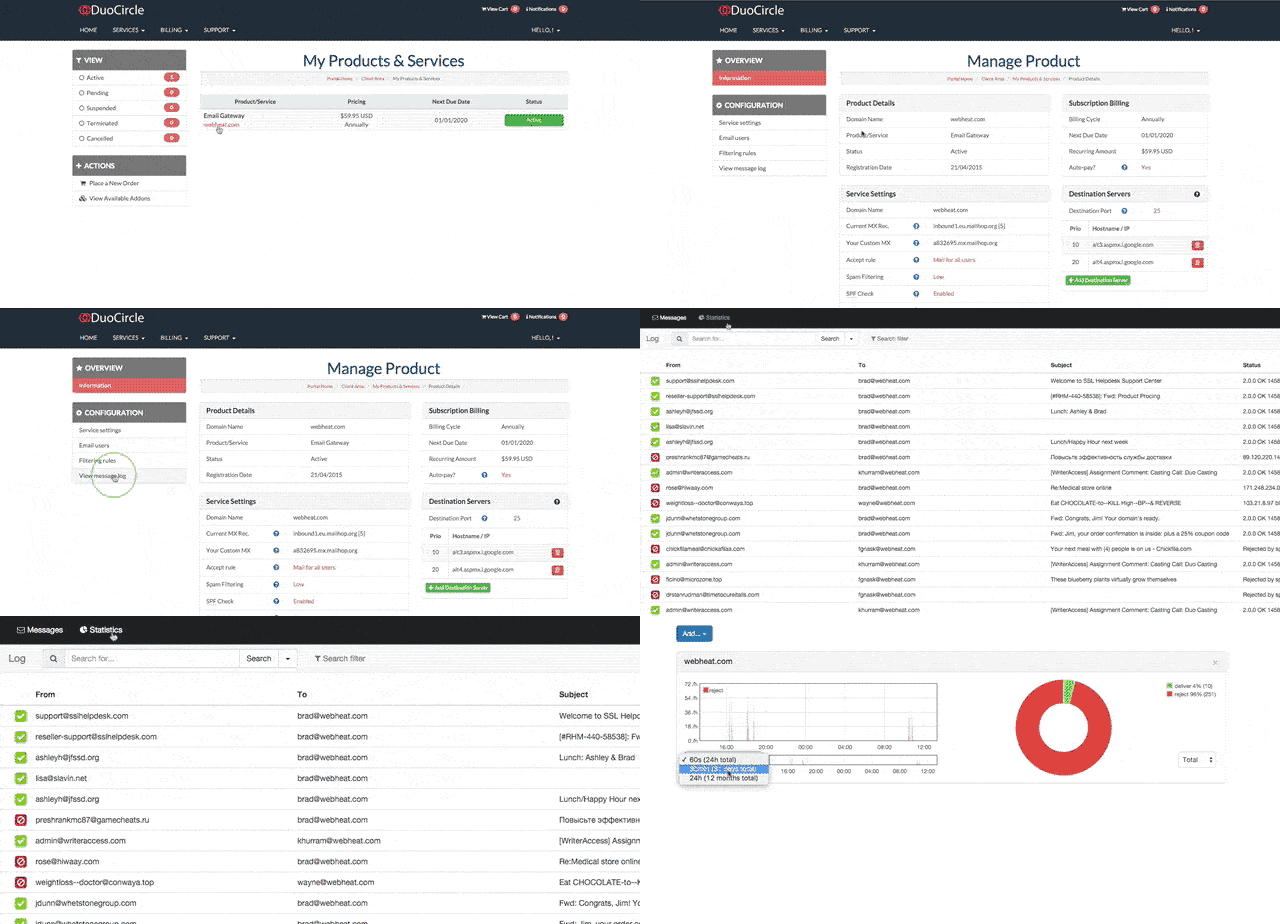
DuoCircle's message logging portal at portal.duocircle.com now includes statistics for outbound SMTP and inbound delivery across all your domains. Sign in, click your service, open Message Logs, and use the Statistics button at the top. Multi-domain accounts see all data in one unified view.
New Feature Announcement – Message Statistics
Last week we announced the roll out of the brand new message logging portal which allows the Administrative user the ability to view all message logs for their associated domain. This week we have enhanced the portal to include message statistics for all outbound SMTP traffic and inbound delivery for your domains. This is a major step forward and allows you to have complete visibility into your message delivery. If you have multiple domains and services, you’ll be able to access all of this information in one unified location.
You can access this new feature by logging into your account portal at https://portal.duocircle.com, clicking on your service and then your message logs. At the top of the message logs you’ll see a button for statistics.

We hope that you find the new feature useful and welcome your feedback and suggestions.
General Manager
General Manager at DuoCircle. Product strategy and commercial lead across the email security portfolio.
Secure your email infrastructure
Protect, authenticate, and deliver. Contact our team to find the right solution.