How DMARC Manages Domains and Subdomains to Prevent Spoofing?

Quick Answer
DMARC handles subdomains using a two-step DNS lookup. The receiving server first queries _dmarc at the exact From-header domain (for example, _dmarc.xyz.testing.com). If no record exists, it derives the organizational domain by trimming back to one label past the public suffix and queries _dmarc there (for example, _dmarc.testing.com). The first match wins; intermediate domains in the tree are ignored. The organizational-domain record applies its sp= tag to subdomains that have no DMARC record of their own. So a record at _dmarc.testing.com covers finance@xyz.testing.com via the second lookup, but a record at _dmarc.xyz.testing.com does not cover help@abc.xyz.testing.com because that intermediate level is never queried.
How DMARC Manages Domains and Subdomains to Prevent Spoofing?

Businesses are now being mindful of protecting their domains with SPF, DKIM, and DMARC, but what about the times when you send emails from your subdomains? As a domain owner or administrator, you create a DMARC record that instructs how email-receiving servers should evaluate incoming emails from your domain to check their legitimacy. This process flows smoothly when domains are included, but it gets a bit complicated with the involvement of subdomains.
To do this, a recipient’s mail server makes a query to retrieve the DMARC record. Managing DMARC policies for both primary domains and subdomains from a unified framework simplifies policy enforcement and management. This helps in ensuring that all email communications are authenticated in a consistent manner.
Read this blog to understand how DMARC deals with domains and subdomains in senders’ email addresses.
How Recipients’ Mail Servers Query DMARC Records for Evaluating Emails’ Authenticity?
This is how the process unfolds-
- The recipient’s server searches for the DMARC record corresponding to the sender’s domain found in the RFC5322 From address.
- It makes a maximum of two DNS requests to find the corresponding DNS record.
- When the sender’s email address has a subdomain in it for which no policy is applied, then it is subjected to the policy applied to the parent domain. In the context of DMARC, a ‘parent domain‘ is the main domain, such as ‘testing.com, ‘and a ‘subdomain’ is a domain that is part of the main domain, such as ‘subdomain.testing.com ‘. In this case, the DMARC policy for any other domain in the tree is ignored.
Let’s understand this better through examples where the sending addresses are on the testing.com domain or its subdomains.
DMARC Record Subdomain Lookup
| From Address | From Domain | First DMARC Record Domain |
|---|---|---|
| employee@testing.com | testing.com | _dmarc.testing.com |
| finance@xyz.testing.com | xyz.testing.com | _dmarc.xyz.testing.com |
| help@abc.xyz.testing.com | abc.xyz. testing.com | _dmarc.abc.xyz.testing.com |
This process stops if the recipient’s server locates a DMARC record corresponding to the testing.com domain in the first attempt. It doesn’t generate more queries and the DMARC record is retrieved from DNS for the testing.com domain and is used for the authentication process.
However, another attempt is made if no DMARC record is found in the first query. DMARC introduces the notion of the organizational domain to determine the second location.
To determine the organizational domain, the receiving server takes the domain from the ‘From’ address. Then, it checks the public suffix list for the largest suffix in the domain. For TLDs like .com and .edu, the suffix is the TLD itself. Lastly, it retains one label after the public suffix and disards the rest.
See an example based on the above-
| Email Address | Organizational Domain |
|---|---|
| finance@xyz.testing.com | testing.com |
| other@anothertesting.org | anothertesting.org |
| new@abc.help.co.uk | abc.help.co.uk (co.uk is the public suffix) |
Now, let’s see the above example again and figure out if the recipient’s mail server can make a second DNS request in each case. If yes, then which domain is going to get checked-
| From Address | Organizational Domain | Checks (yes or no) | Second DMARC Record Check |
|---|---|---|---|
| employee@ testing.com | testing.com | No | N/A |
| finance@xyz. testing.com | testing.com | Yes | _dmarc.testing. com |
| help@abc.xyz. testing.com | testing.com | Yes | _dmarc.testing.com |
DMARC Record Second Lookup
In this second scenario, a second lookup is made on the presumption that no record was found on the first lookup. So, when a DMARC record is defined on _dmarc.testing.com, the policy of that DMARC record will be applied to the email.
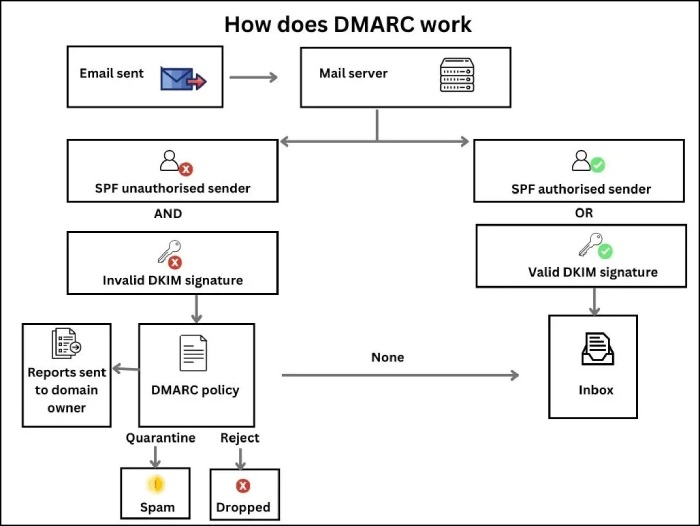
DMARC Subdomain Lookup
This scenario is confusing because, in the second case, a second DNS query is made against the _dmarc.testing.com domain.
It’s important to note that although abc.xyz.testing.com is a subdomain of xyz.testing.com, there is no DMARC record lookup against _dmarc.xyz.testing.com. Therefore, even if a DMARC record exists at _dmarc.xyz.testing.com, it will not apply to this message.
Fortify Phishing and Spoofing with DuoCircle
We at DuoCircle aim to simplify the process of understanding, deploying, and managing DMARC and its companions—SPF and DKIM—making them accessible for companies that don’t want to onboard extensive technical expertise. Our DMARC reports are not in the complex XML language; rather, we create them in simple English that anyone can understand; you don’t have to be a tech ninja.

Talk to us and see how we offer real-time monitoring and alerts, allowing you and our team to collectively respond to potential email security issues. Also, feel free to scroll through our ebook on best email security practices for small and medium businesses.
Topics
General Manager
General Manager at DuoCircle. Product strategy and commercial lead across the email security portfolio.
Secure your email infrastructure
Protect, authenticate, and deliver. Contact our team to find the right solution.