Resolving the Issue of Google Calendar Invites Failing DMARC Checks

Quick Answer
Google Calendar invites can fail DMARC because replies route back through Google's servers, breaking SPF alignment with the From domain. Google also sends invites from shared IP ranges that may carry mixed reputation. Fix it by enabling DKIM signing in Google Workspace: copy the DKIM record from Admin Console, Apps, Google Workspace, Gmail, Authenticate Email; publish it as a TXT record at google._domainkey.yourdomain; then turn on authentication. Once DKIM aligns with the From domain, Calendar invites pass DMARC even when SPF does not.
Resolving the Issue of Google Calendar Invites Failing DMARC Checks
Sometimes, Google Calendar invites don’t pass DMARC authentication checks because when the recipient replies to the invitation, the response is sent back through Google’s servers. Since the ‘From’ address and the originating servers don’t align, the Google Calendar invitation gets rejected as the sending domain’s DMARC policy instructs so.
Another reason is that Google uses shared IP addresses to send invites, and if any of these IPs have a history of spam or abuse, DMARC authentication will show negative results.
This can be resolved by adding Google’s DKIM record to your DNS, followed by turning on DKIM authentication on Google Workspace.
Resolving the Issue
Google has been supportive of DMARC, and hence, resolving this issue isn’t a big deal. You need to proceed like this-
Step 1: Add Google’s DKIM Record to Your Domain’s DNS
- Go to the Google Workspace admin console.
- Click on ‘Settings for Gmail,’ followed by navigating to ‘Authenticate Email.’
- Copy the DKIM record Google will use to digitally sign your emails for authentication.
- Add the copied DKIM record as a TXT record to google._domainkey.
Step 2: Turn on DKIM Authentication
- Go to the Google Workspace admin console.
- Click on ‘Settings for Gmail,’ followed by navigating to ‘Authenticate Email.’
- Click on ‘Start Authentication.’
Best Practices for DKIM Keys
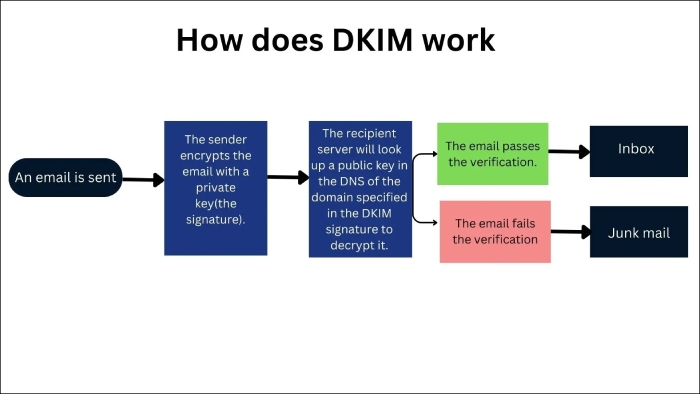
DKIM keys are cryptographically secured pairs of keys that provide a mechanism for email recipients to verify that an email is actually send by who it is claiming to come from and that no one has tampered with its content in transit.
Now that you know how to solve the Google Calendar invite problem, follow the best practices shared below to avoid DKIM-based email authentication issues.
Key Length
Shorter keys are easier to break and decipher; hence, don’t use keys shorter than 2048-bit. Earlier, even 1024-bit was considered strong, but the technical progression, both malicious and ethical, has demanded a more complex key structure.
Periodic Rotation
Although the ideal DKIM key rotation frequency depends on your company’s operational needs, availability of technical resources, and risk exposure, it’s advised that you rotate it at least twice a year or every six months. Quarterly rotations are more suitable for better cyber threat prevention.
Expiration
Expiration dates are important as they disallow threat actors to continue exploiting DKIM keys if they get compromised. When generating DKIM keys, administrators specify an expiration date. Keeping track of these expiration dates is important to ensure timely key rotation.
Test Mode
Testing mode helps determine whether the DKIM key is working efficiently against cyber exploitations. You can indicate the test mode by specifying ‘t=y’ and changing the value to ‘t=s’ before deploying the protocol so that the mail provider doesn’t disregard the DKIM signature.
Monitoring
Organizations can implement alerting systems that notify administrators or security teams when DKIM authentication failures are detected. These alerts can prompt immediate investigation and remediation to address any issues with DKIM-signed emails.
Another effective way to monitor DKIM is through log analysis, which helps identify patterns of DKIM failures, detect potential security threats, and troubleshoot delivery issues emerging from DKIM misconfigurations.
Lastly, DMARC reporting also helps monitor issues in your DKIM configurations. Contact DuoCircle for any inquiries regarding this topic.
Topics
General Manager
General Manager at DuoCircle. Product strategy and commercial lead across the email security portfolio.
Secure your email infrastructure
Protect, authenticate, and deliver. Contact our team to find the right solution.