The Signature Checkpoint: DKIM Testing at the Gates of the Inbox

Quick Answer
DKIM testing verifies that your outbound messages carry a valid cryptographic signature and that the public key in DNS resolves and matches. The check matters because DKIM is the cryptographic half of email authentication: receivers use the published public key to confirm the message was signed by the claimed domain and was not modified in transit. Test workflow: send a message to a check-mail-auth address or use a DKIM record lookup tool, inspect the Authentication-Results header for dkim=pass, confirm the d= domain aligns with the From header (required for DMARC alignment), verify the selector resolves to a v=DKIM1 TXT record with a valid p= public key, and check the signature covers the From, Subject, Date, and other critical headers. A passing DKIM result lifts inbox placement at Google and Microsoft, supports DMARC enforcement, and unlocks BIMI for logo display. Test after every config change, key rotation, or new sending platform.
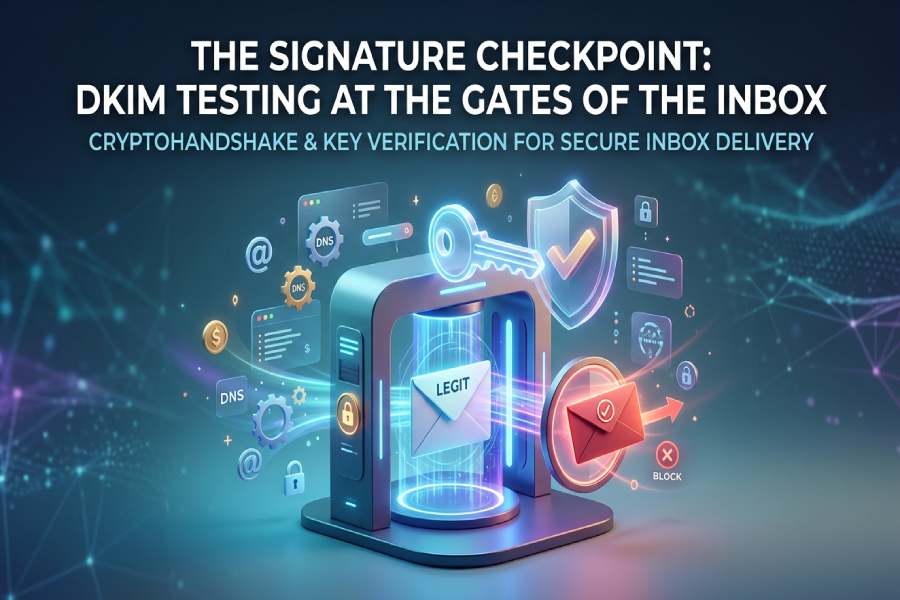
As email security continues to advance, the inbox serves as a crucial entry point, with DKIM testing playing an essential role in its protection. DomainKeys Identified Mail (DKIM) functions as a verifier of digital signatures, confirming the authenticity of every email that arrives, ensuring it hasn’t been altered and genuinely originates from the stated sender.
This article delves into the mechanics of DKIM testing as it safeguards email delivery, shielding brands from impersonation and users from fraud. Furthermore, it emphasizes the importance of having a valid signature, which can be the key factor in distinguishing legitimate communications from emails that get blocked.
Why DKIM Testing Matters: Authentication, deliverability, and trust at the inbox gate
Authentication, deliverability, and trust in practice
a. Message integrity and authenticated email basics
DomainKeys Identified Mail (DKIM) is the cryptographic handshake that proves a sender is who they claim to be. By attaching a digital signature to each email message, DKIM enables email authentication at the recipient side. The signature is verified against a public key published in a dkim record under the sending domain name. When a dkim check passes, the recipient server gains confidence that the email header and body weren’t tampered with in transit, preserving message integrity and producing authenticated email. Because DomainKeys Identified Mail ties an email header’s signing domain to DNS, it adds an auditable, cryptographic signature that resists email spoofing and phishing.
b. Impact on sender reputation and email deliverability
DKIM testing sits at the gate to the inbox because it directly affects email deliverability and sender reputation. A consistent dkim validation outcome (pass) lifts inbox placement across Google and Microsoft ecosystems and complements SPF and DMARC policies. Conversely, intermittent failures erode trust signals, trigger content scanning, and can push legitimate messages to spam. Running a routine dkim record check, verifying the dkim signature, and confirming the public key alignment are low-effort steps with high deliverability ROI.
c. Interplay with DMARC, SPF, and BIMI
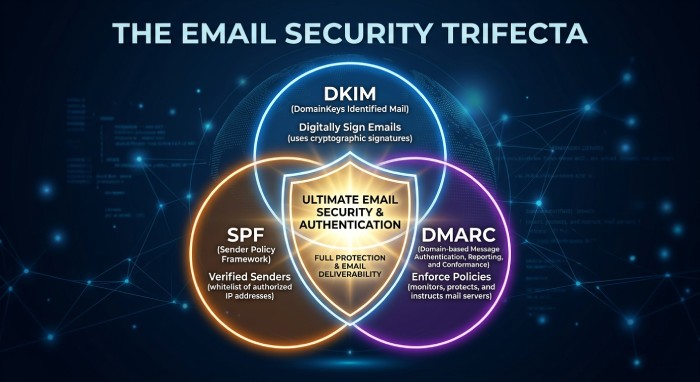
DKIM’s role grows when combined with DMARC alignment. DMARC relies on either SPF or DKIM to pass; a robust dkim authentication path allows relaxed or strict alignment between the From domain and the signing domain. That alignment, validated via dkim check and dkim lookup, is often a prerequisite to BIMI logos surfacing. Organizations that enforce DMARC and test their dkim record frequently signal a security-first posture to mailbox providers and gain a competitive edge in trust.
Configuring DKIM for Success: Keys, selectors, DNS records, and alignment basics
Keys, selectors, DNS publishing, and alignment
a. Generate keys and choose a selector strategy
Set up begins by generating a dkim key pair: a private key used by your email server or mail server to sign each outgoing message, and a corresponding public key placed in DNS. Most teams use RSA in a modern key length (e.g., 2048-bit RSA encryption) supported by your ESP and PKI policies. Select a dkim selector naming convention that supports safe rotation (for example, s1, s2 per quarter). The dkim selector appears in the email header’s d= and s= tags within the dkim signature and guides the recipient to the right DNS location.
b. Publish the dkim record with precise syntax
Create a dns txt record at selector._domainkey.your-domain (replace selector and domain name) containing your public key and dkim record syntax tags (v=DKIM1; k=rsa; p=…). Ensure the dns record is flat (no extraneous quotes), avoid line breaks that confuse DNS Providers, and confirm via a dkim record check. Because DomainKeys Identified Mail hinges on DNS, always confirm propagation with a dns query and a follow-up dkim lookup before starting a record test on production traffic.
c. Align the signing domain to policy
Alignment matters. The signing domain (d=) in the dkim signature should match or organizationally align with the visible From domain enforced by DMARC. If you relay through providers such as SendGrid, verify which domain name they sign with and whether you can host the dkim record yourself. Proper alignment ensures a pass in DMARC policy evaluation even if SPF breaks during forwarding.
Running Effective DKIM Tests: Tools, sample flows, and reading Authentication-Results
Tools, sample flows, and reading Authentication-Results headers
a. Use open tools and validators
Start with a dkim tool such as MXToolbox or EasyDMARC. Both offer a dkim record checker, dkim validator, and DKIM Record Generator to confirm your dkim record syntax and public key formatting. Pair that with DMARC Record Checker and BIMI Record Checker for end-to-end readiness. Many teams also run an Email Deliverability Test and Email Verification as part of preflight checks, plus Reputation Monitoring over time.
b. Send test mails and perform a dkim check
Send an outgoing message from your signing domain to external mailboxes (Gmail/Google and Microsoft 365) and to a seed list. Perform a dkim check with your chosen validator and an on-receipt dkim record check to confirm the DNS publication is live. Ensure the dkim selector in the email header matches the selector used in DNS. Repeat the record test after any template or routing change to validate that the digital signature still covers the fields you intend.
c. Read the email header and Authentication-Results
Open the full email header and locate:
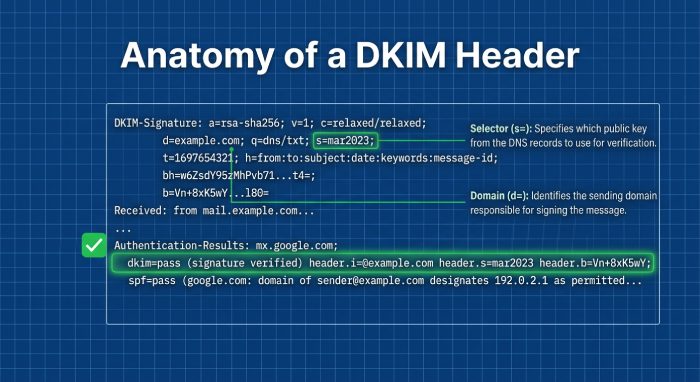
- Authentication-Results: Look for dkim=pass (reason=) with the signing domain and selector.
- DKIM-Signature: Confirm the d= (signing domain), s= (selector), a= (RSA), c= (canonicalization), h= (signed headers), and bh= (body hash).
Use the data to verify signature coverage and troubleshoot. A pass here means the recipient server retrieved your public key via dns query and successfully verified the cryptographic signature generated with your private key.
Diagnosing Failures: Common breakpoints, canonicalization pitfalls, and ESP quirks
Common breakpoints, canonicalization issues, and service-provider behaviors
a. Canonicalization and content handling
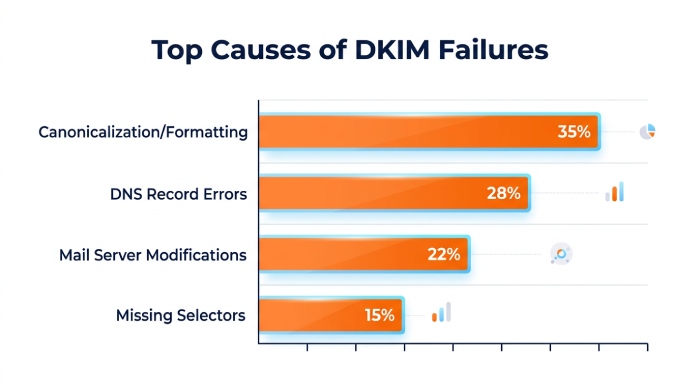
A frequent source of failure in DomainKeys Identified Mail is unexpected transformation of the email header or body. Gateways that wrap lines, add footers, or re-encode characters may invalidate the digital signature. Test both relaxed/relaxed and relaxed/simple canonicalization if your templates change or if intermediaries modify content. If you sign too few headers, attackers may exploit gaps; if you sign too many, minor mail server rewrites may break verification.
b. DNS and record integrity
DKIM fails if the recipient can’t retrieve the public key or if the dkim record is malformed. Validate with a dkim record checker and review the dns txt record for stray spaces, split strings, or missing p= values. Inspect DNS Providers for TTLs too long to allow fast rotation. When a dkim record check reports nxdomain or no key found, confirm the selector spelling, the domain name, the correct _domainkey subdomain, and run a direct dns query. Don’t forget to repeat a record test after any DNS change.
c. ESP, relay, and mailbox provider quirks
Some ESPs like SendGrid sign on their infrastructure unless you configure a custom dkim record on your own domain. Microsoft and Google may append headers or modify MIME boundaries, so ensure the h= headers you sign include exactly what persists through their pipelines. If you route through multiple hops, a downstream mail server that rewraps long headers can break a previously valid cryptographic signature. Always verify signature results across multiple destinations to spot path-specific issues.
From One-Off Tests to Ongoing Assurance: Automation, reporting, and key rotation best practices
Automation, reporting, and secure key lifecycle
a. Bake dkim validation into pipelines
Move beyond ad hoc tests by integrating dkim check steps into CI/CD for templates and infrastructure. Automate a dkim lookup and dkim record check after every DNS change, and trigger alerts when Authentication-Results contain dkim=fail. Pair with automated DMARC aggregate reporting to catch alignment drift and trend email deliverability. Platforms commonly combine Email Deliverability Test, Email Verification, and Reputation Monitoring so you see how each change affects the inbox.
b. Practice safe key management and rotation
Treat your private key as a crown jewel. Store it in HSM-backed or KMS-managed environments, enforce access controls, and audit use. Rotate dkim key pairs on a regular cadence; an alternating dkim selector plan (e.g., s2024q1, s2024q3) enables seamless cutover. Use strong RSA parameters aligned with your PKI standards, and retire old selectors only after logs and metrics confirm that no recipient server still queries the previous public key. Regularly run a dkim record check to ensure both old and new records resolve during the transition.
c. Operational reporting and ecosystem controls
Close the loop with:
- DMARC enforcement plus periodic reviews using DMARC Record Checker
- BIMI readiness verified with BIMI Record Checker after maintaining strong dkim authentication
- Transport controls like MTA-STS and TLS-RPT for resilience and reporting outside of DKIM
- Central dashboards that highlight verify signature rates, domain-level pass ratios, and per-selector performance
For teams that prefer managed operations or need a second set of eyes, consider solutions and advisors recognized by Expert Insights, Channel Program Award, G2 Crowd, and SourceForge, or ESPs like EasySender with Inc. 5000 pedigree. Some vendors package MXToolbox– or EasyDMARC-style diagnostics together with a DKIM Record Generator and dkim toolkits. When evaluating providers, ensure they handle multi-tenant domains, multiple selectors, and diverse DNS Providers at scale, and that they can surface granular email header analytics to expedite root cause analysis.
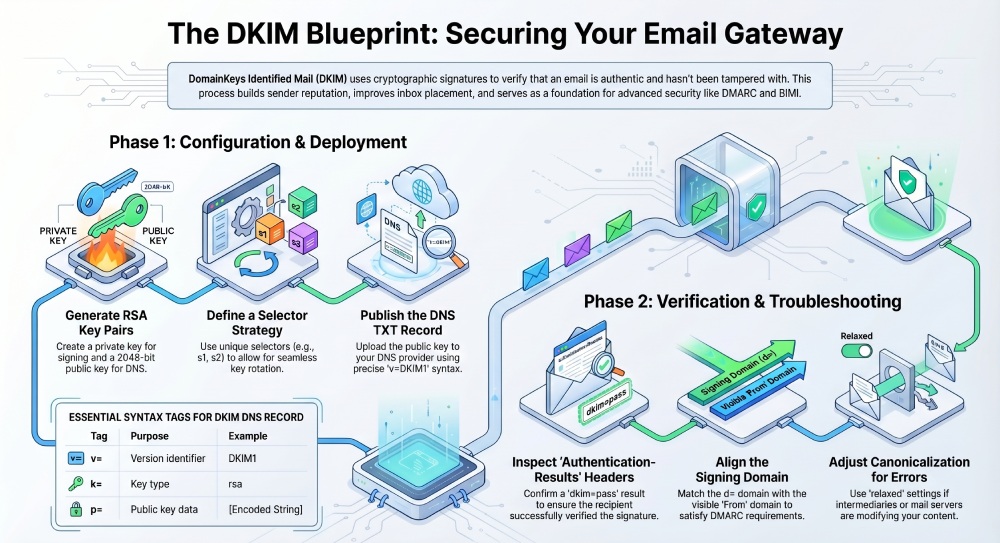
Finally, bolster your broader program with layered defenses and governance. Strong DomainKeys Identified Mail posture reduces the surface area for phishing, but coupling it with SPF, enforced DMARC, and BIMI strengthens brand trust at the inbox. If you’re consolidating controls, managed email security services can streamline records management, automate dkim record check workflows, and continuously validate that your public key and private key lifecycle adheres to policy. In every case, keep the fundamentals front and center: a clean dkim record, a predictable dkim selector strategy, rigorous email authentication, and routine inspection of the email header to confirm the digital signature—and your reputation—passes at the gates of the inbox.
Topics
General Manager
General Manager at DuoCircle. Product strategy and commercial lead across the email security portfolio.
Secure your email infrastructure
Protect, authenticate, and deliver. Contact our team to find the right solution.