Unintentional DKIM failures: common message modifications that trigger false positives

Quick Answer
DKIM verifies a cryptographic hash of headers and body, so any modification in transit breaks the signature even when no attacker is involved. Common causes of false-positive DKIM failures: line wrapping changes when a relay enforces RFC 5322 or 2045 line-length limits, footer or disclaimer injection by mail servers or compliance gateways, character encoding conversions between 7-bit, 8-bit, and quoted-printable, whitespace normalization, and content modifications by mailing list managers. Mitigations: use the relaxed canonicalization mode (c=relaxed/relaxed) which tolerates whitespace and case changes, keep mailing list software at versions that support ARC to preserve original authentication, avoid post-signing footer injection on the sending side, and watch DMARC forensic reports for systematic dkim=fail patterns from specific intermediaries.
Unintentional DKIM failures: common message modifications that trigger false positives
DKIM is highly sensitive to alterations. This sensitivity is what makes DKIM a robust protocol against phishing attacks attempted by changing the email content while it’s in transit. However, sometimes inadvertent modifications happen in transit, which triggers emails to fail DKIM authentication even if a malicious entity hasn’t altered them. This blog lists the common unintentional modifications that lead to false positives.
Line wrapping/ line break changes
Line wrapping or line break changes happen when email servers or gateways make some changes in the email’s body by inserting, removing, or adjusting line breaks. This modification is usually made when an email relay has to abide by the ‘per line character limit’ imposed by RFC 5322 or RFC 2045. These minor adjustments mean nothing for the sender and the recipient because the content remains the same; however, DKIM relies on an exact cryptographic hash, and that’s why verification checks fail.
Whitespace modifications
White space modifications refer to the unintended alteration of spaces, tabs, or line breaks in an email’s body while it is in transit. Mail Transfer Agents (MTAs), email security gateways, or anti-spam filters try making these changes to reformat messages for consistency or better readability. Sometimes, systems trim extra spaces, replace tabs with spaces, or normalize multiple spaces into a single space so that the content complies with the format laid down by RFC 5322.
Header rewriting or reordering
This alteration refers to the inadvertent insertion of headers, modification of existing headers, or reordering of headers once they are signed. This invalidates the DKIM signature. Common examples are- Adding ‘Received’ or ‘X-’ headers during email routing.
Attachment modifications
It’s not unusual for email attachments to undergo modifications during transmission. Security policies, virus scanning, and mail server optimizations often make these alterations while inspecting and processing attachments to determine whether they contain malware. These systems also ensure email attachments comply with corporate policies and MIME standards. They may replace infected files with warning messages, compress attachments, or convert file formats (e.g., .docx to .pdf).
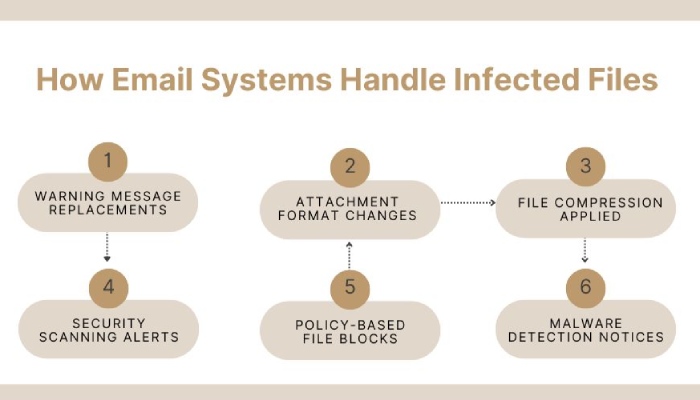
While these changes enhance security, they can invalidate DKIM signatures if any modified portion was included in the cryptographic hash when the email was originally signed.
HTML to plain text conversions
While most email systems support both HTML and plain text formats to ensure compatibility with different email clients and devices, MTAs and security gateways convert HTML to plain text. This conversion reduces the risk of phishing, enhances deliverability, and improves compatibility with legacy email clients.
This change may sound harmless to you, but for DKIM, it means that the email structure is stripped out because of missing HTML tags, inline CSS, embedded images, hyperlinks, and formatting attributes.
How to reduce false positives?
Here’s a quick run-down on what you can do to avoid triggering DKIM for genuine emails sent from your domain-
- Use the ‘relaxed’ canonicalization (e.g., c=relaxed/relaxed) for both headers and body to allow minor modifications (e.g., extra spaces).
- Avoid overly strict DKIM policies that require exact byte-for-byte matching.
- Minimize post-send processing (e.g., avoid adding disclaimers after DKIM signing).
If you need professional help, feel free to get in touch with us or explore DuoCircle for expert email security solutions.
Topics
General Manager
General Manager at DuoCircle. Product strategy and commercial lead across the email security portfolio.
Secure your email infrastructure
Protect, authenticate, and deliver. Contact our team to find the right solution.