Best practices for sending bulk emails on Gmail: A detailed guide

Quick Answer
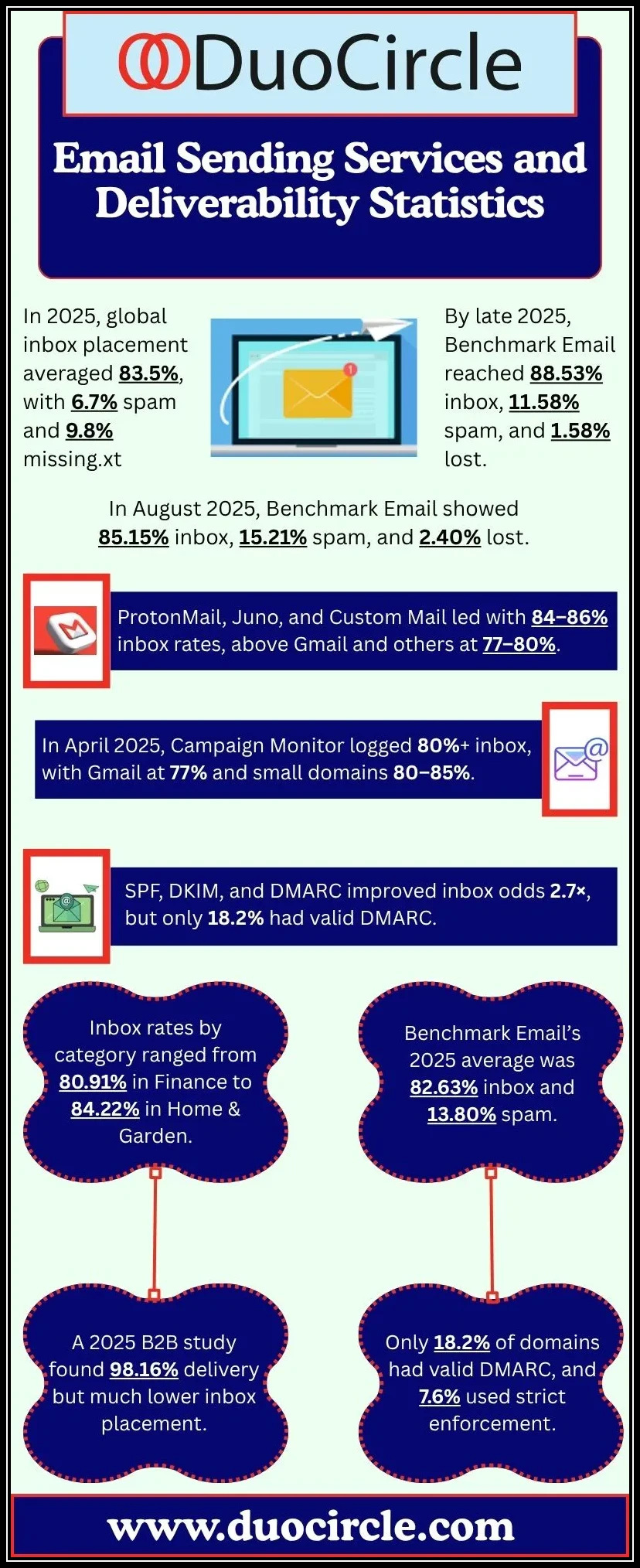
Sending bulk email through Gmail without getting flagged comes down to a small set of rules. Build a segmented list and only mail people who opted in. Personalize the recipient name and content rather than blasting generic copy. Write subject lines that describe the message instead of clickbait. Optimize for mobile, since most reads happen there. Keep the layout clean: minimal links and images, conversational text, no excessive formatting. Respect Gmail's sending limits, 500 messages per day for personal accounts and 2,000 per day for Google Workspace; exceed those and the account gets temporarily suspended. Comply with local bulk email laws, which usually require sender name, address, and a working unsubscribe link. Watch BCC use, monitor engagement, and tell recipients up front how often you'll mail. Gmail is not designed as a bulk sending platform, so for high-volume marketing add a sending service with proper SPF, DKIM, and DMARC alignment on top of these habits.
Best practices for sending bulk emails on Gmail: A detailed guide
Reaching out to your target audience in today’s highly competitive time requires not only great skills but a fail-proof strategy as well. Sending bulk emails is one such surefire strategy that enables you to reach out to a large audience with your brand message. However, if you fail to adhere to Gmail policies and local regulations, your emails can soon turn out to be spammy. When you follow the right practices, it guarantees that your emails will reach the right inboxes and resonate with your audience. Also, you won’t be easily marked as a spammer!
Here’s a comprehensive guide on the best practices to follow while sending bulk emails!
Build a high-quality email list
Start by building an email list and treat it as your holy grail to growth. Segment the list into multiple categories, such as engagement levels, demographics, and purchasing power. This will result in improved email deliverables, lower unsubscribe rates, and high engagement rates.
Hyper-personalize your emails
No one has time or energy to go through your generic emails, and they get flagged as spam very easily. So, always aim to hyper-personalize your emails from top to bottom.
Some quick personalization hacks include using the name of the recipient, complimenting them for some recent achievement, showing them what you’ve got specifically for them, and avoiding a salesy tone.
Churn out the best subject lines
The fate of your email depends on the subject lines you use. Curate your subject lines in such a way that it sparks curiosity and familiarity in your recipient’s mind. Never make the subject line clickbaity.
Optimize for mobile devices
Make sure that your bulk emails are optimized for mobile devices. People generally check their emails on phones while on the go or using the restroom.
Make sure your email design is appealing enough
Gmail is known for its sophisticated algorithm that detects spammy emails easily. Keep your email content conversational. Do not add excessive links or images. Simple, clutter-free and well-structured emails perform well.
Understand the Gmail sending limits
Gmail has a daily sending limit. For personal accounts, it is 500 emails/day. For Google Workspace accounts, the limit is 2,000 emails/day. If you exceed the limits, then it can get your account suspended on a temporary basis.
Comply with applicable SPAM laws
Follow your local bulk emailing laws and regulations. For e.g., depending on your region, you may have to include sender details like name and address.
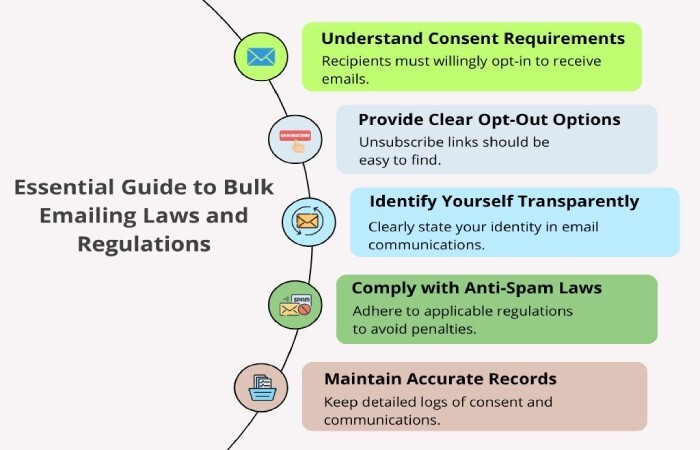
These are the top bulk email-sending practices that will help you not end up in the spam folder. Some other important things that you should consider are:
- BCC with caution
- Always include an ‘Unsubscribe’ button or link
- Keep a tab on regular engagement
- Hint your audience about email frequency
- Do not share deceptive or spammy content
- Always seek recipients’ consent
Gmail isn’t a bulk emailing platform; however, following these practices, along with utilizing DuoCircle, can definitely improve your email deliverability and keep your account safe and clean.
Topics
General Manager
General Manager at DuoCircle. Product strategy and commercial lead across the email security portfolio.
Secure your email infrastructure
Protect, authenticate, and deliver. Contact our team to find the right solution.