Custom Spam levels

Quick Answer
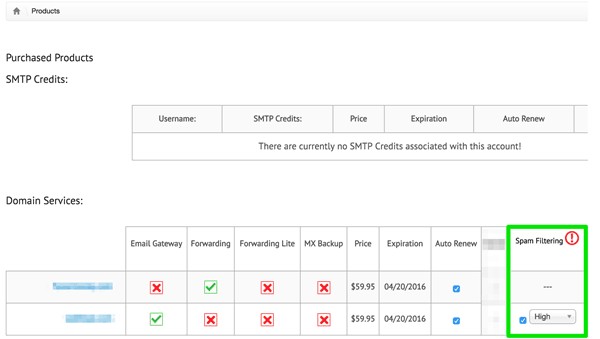
DuoCircle spam filtering supports three thresholds in the admin portal: low, medium, and high. Medium is the default. High applies the strictest rules, catches more spam, and produces more false positives that have to be released through the whitelist. Low lets more spam through but reduces false positives, which suits sites that already run a downstream filter on their own mail server. Email gateway and backup MX customers can also opt out of spam filtering entirely for mail going to their own server. Opt-out is not available for mail destined for large ISPs like Gmail, Yahoo, or AOL. Settings live on the products page in the admin dashboard.

We have just added a new feature to the admin portal, and it is the ability to select a threshold for your inbound spam filtering. Depending on your business needs you can set the threshold to either low, medium or high and our system will then apply a different set of rules and thresholds to your mail.
If you select high, we will have a very low threshold for what is considered spam, this level should really only be used if you are getting absolutely innundated with spam and you are comfortable with the knowledge that we may have a higher degree of false positives and some legitimate mail may get blocked. You’ll have to use your whitelist setting to override these instances of false positive.
If you feel that our default spam level which is medium is catching and classifying more mail as spam than you would like, you can set your threshold to low, more spam will get though but your email client or spam filtering on your own internal mail server might improve the catch rate.
If you would like to completely opt-out of spam filtering and you are a email gateway or backupMX customer you can do so. There are a few restrictions on the complete opt-out setting. We will not be able to opt you out of spam filtering for mail that is going to a large ISP like gmail, yahoo, aol etc. However if you are sending it to your own mail server the opt-out button will be there.
You can access these new settings on the products page.
If you have any questions about this new feature, please contact our support department.
General Manager
General Manager at DuoCircle. Product strategy and commercial lead across the email security portfolio.
Secure your email infrastructure
Protect, authenticate, and deliver. Contact our team to find the right solution.