Handling False Positives and Negatives in Email Filtering

Quick Answer
False positives are legitimate emails wrongly classified as spam or malicious, blocking real communication. False negatives are spam or phishing emails that slip past filters into the inbox, leading to credential theft, malware downloads, and fraudulent transfers. Both happen because filters use rule-based and reputation-based algorithms that are not 100% accurate, and AI-generated phishing has made evasive emails harder to catch. Prevention: use reputable filtering tools, review and tune settings regularly, keep all software updated, maintain allowlists and blocklists, and use encryption, MFA, and rotating passwords. Handling: review the spam folder for missed legitimate mail (mark as not spam), review the inbox for missed spam (mark as spam or delete), notify senders or recipients when something seems wrong, report issues to your filter provider, and review filter performance for patterns. DMARC is not a spam filter but pairing it with SPF and DKIM reduces both error types by improving authentication accuracy.
Handling False Positives and Negatives in Email Filtering

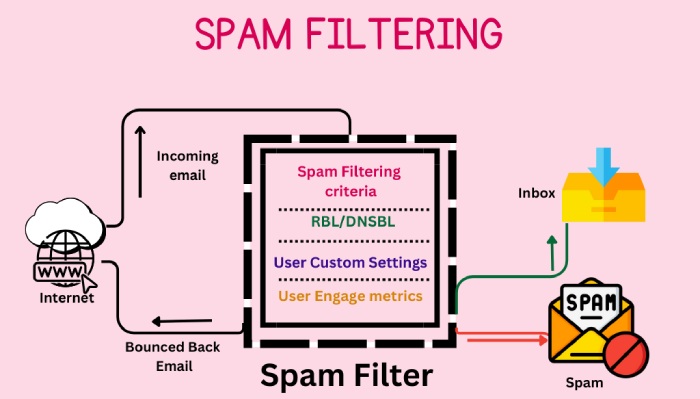
False positives happen when email filters misjudge genuine emails and mark them as spam or malicious. On the other hand, false negatives are illegitimate and spam emails that pass through these filters without getting detected. Both are problematic for legitimate senders and recipients. Because of false positives, important emails don’t land in the recipients’ inboxes and impact communications. Whereas, due to false negatives, recipients end up getting tricked into downloading malware-infected files, sharing sensitive details, transferring money, etc.
Why False Positives and False Negatives Occur?
Email filtering tools are not 100% accurate and consistent, as they are based on algorithms driven by criteria and rules to evaluate the content, headers, attachments, senders, and reputation of incoming emails. So, sometimes, they can be too strict or too lenient, depending upon the configurations and algorithms.
What’s even more bothering is that threat actors are becoming sophisticated with their techniques and are able to create emails that look genuine and, hence, bypass spam filtering. A large chunk of the credit for generating these sophisticated phishing emails goes to AI tools.
How to Prevent False Positives and False Negatives?
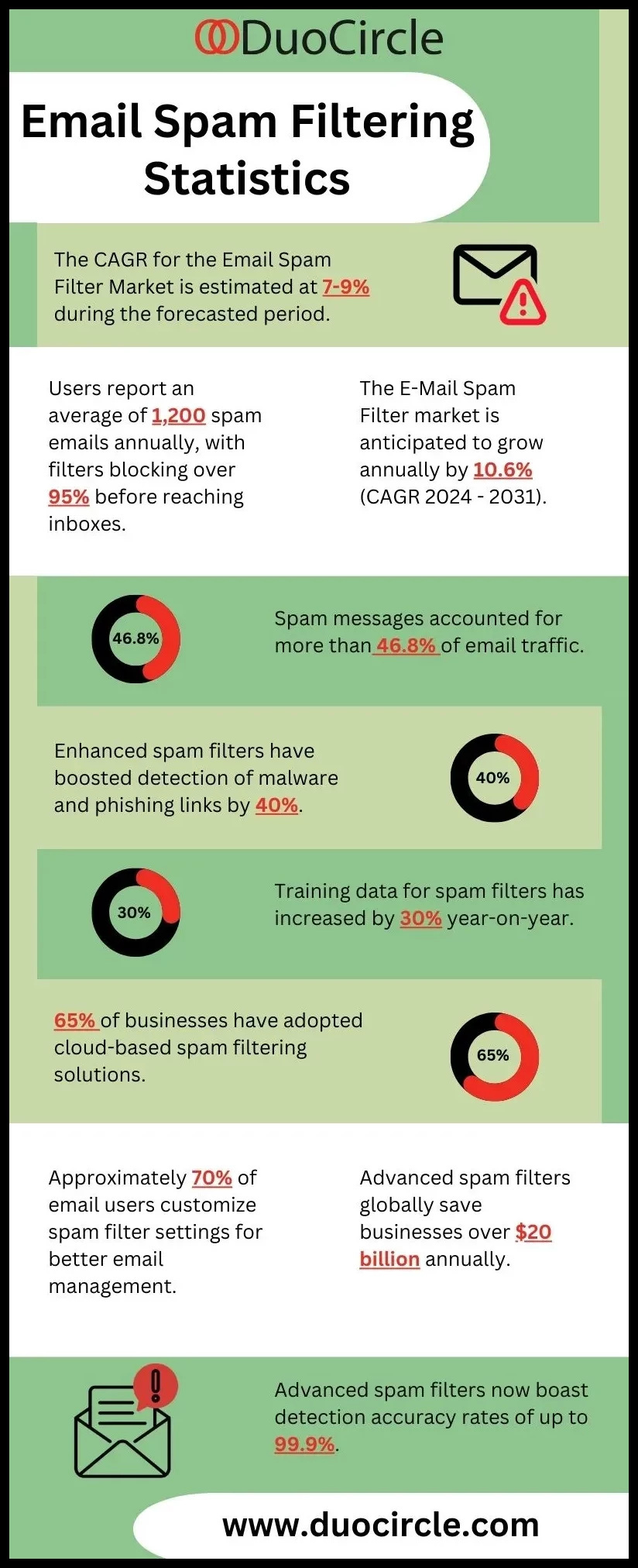
Fortunately, there are practical steps you can take to prevent false positives and negatives. By optimizing your email filters and adopting secure email-sending practices, you can significantly reduce the risks of these issues. Here are a few strategies you can implement:
- Opt for reliable and reputable email filtering tools that offer the best possible accuracy, efficiency, flexibility, and customization.
- Regularly review the settings and adjust them as required.
- Keep the email filtering tools and all devices using which you access your emails well updated.
- Create an allowlist and blocklist of senders and domains you trust or mistrust, respectively.
- Use encryption, multi-factor authentication, and set up a strong password that you must change every 3-6 months.
How to Handle False Positives and Negatives?
Even with the best prevention measures, false positives and negatives can occur. To manage them effectively:
Check Your Spam Folder
Regularly review your spam folder for any legitimate emails that were mistakenly marked as spam. Mark these emails as ‘not spam,’ or move them to your inbox.
Review Your Inbox
Carefully examine your inbox for any spam emails that were not caught by your filter. Mark these emails as spam or delete them.
Communicate with Senders and Recipients
If you suspect a false positive or false negative, notify the sender or recipient and ask them to resend or confirm the message.
Report Issues
Report any false positives or false negatives to your email filtering service or software provider. Provide feedback to help them improve their system.
Periodic Review
Regularly review your email filtering performance and results. Look for patterns or anomalies that might indicate a problem.
By following these steps, you can handle false positives and negatives efficiently and help improve the accuracy of your email filtering system.
Does DMARC Prevent False Positives and Negatives?
DMARC itself is not designed to prevent false positives and negatives directly but to enhance the overall email authentication process by building on SPF and DKIM. However, implementing DMARC correctly can significantly improve email security by reducing the likelihood of both false positives and false negatives, ensuring that emails are properly authenticated. Contact us to get started with DMARC.
Topics
General Manager
General Manager at DuoCircle. Product strategy and commercial lead across the email security portfolio.
Secure your email infrastructure
Protect, authenticate, and deliver. Contact our team to find the right solution.