DMARC ‘fo’ tag options and their meanings

Quick Answer
The fo tag in a DMARC record controls when failure (RUF) reports are generated. It has four values that can be combined. fo=0 (default) generates a report only when both SPF and DKIM fail to produce an aligned pass, capturing only hard failures. fo=1 generates a report whenever SPF or DKIM fails to produce an aligned pass, which surfaces every alignment issue and is the recommended setting for active troubleshooting. fo=d generates reports only on DKIM signature failures, regardless of alignment, useful when isolating DKIM problems. fo=s generates reports only on SPF failures, regardless of alignment. Failure reports include the sender IP, signing domain, timestamp, and the specific authentication and alignment results. If reports are not arriving despite a configured fo tag, check that the rua and ruf email addresses are correct and that the receiving provider supports failure reports (many do not send RUF for privacy reasons).
DMARC ‘fo’ tag options and their meanings
The ‘fo’ tag in DMARC stands for ‘failure options.’ It’s an optional tag that helps domain owners specify the types of authentication and alignment issues that must be reported. This tag supports four specific types of failure reports: fo=0, fo=1, fo=d, and fo=s. The ‘fo’ tag can combine multiple reporting options, enabling you to create a customized reporting strategy that aligns best with your preferences and risk tolerance.
This optional tag defines how RUF reports should be generated. It’s important to regularly receive and analyze failure reports as they include crucial insights like:
- The sender’s IP address
- The sending domain
- The time of the message
- The cause(s) behind the authentication failure
- SPF and DKIM alignment results
By strategically analyzing the above information, you find out which legitimate mail servers are being subjected to false positives and why. Apart from this, you detect malicious activities being attempted in your name.
DMARC ‘fo’ tag options
There are four ‘fo’ tag options. Here’s what each of them means.
fo=0 (default option)
When this option is used, DMARC failure reports are produced only if both SPF and DKIM don’t generate an aligned ‘pass’ result. Simply put, fo=0 generates reports only for hard authentication failures that you, as a domain owner, can’t afford to ignore.

fo=1 (recommended option)
When fo=1 is used, DMARC failure reports are produced if SPF or DKIM doesn’t generate an aligned ‘pass’ outcome. This option is recommended as you get reports for all failure episodes and not just the severe ones.
fo=d (DKIM-specific option)
fo=d is used to specify that failure reports should only be generated for messages that fail DKIM signature evaluations, irrespective of alignment status. This is ideal for the time period where you are only focusing on knowing and fixing DKIM-specific issues.
fo=s (SPF-specific option)
This setting generates failure reports only for emails that fail SPF checks, irrespective of the alignment status. It’s ideal for domain owners who are focusing on SPF-related issues.
When to use each failure reporting setting?
- Start with the default fo=0 setting so you are not bombarded with too many reports. Stick to this option until you have a proper process in place.
- Gradually proceed to fo=1 if you want more comprehensive failure reports.
- If you only want to focus on DKIM-related issues, choose fo=d.
- If you only want to focus on SPF-related issues, choose fo=s.
- You can combine options that best align with your email authentication goals.
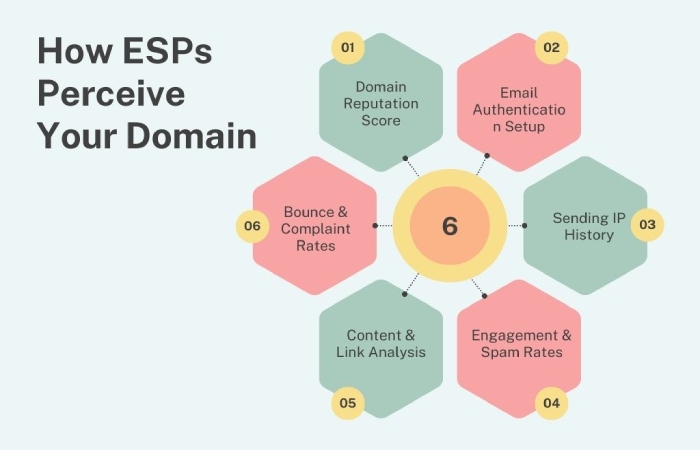
- Don’t underrate the capabilities of failure reports. Keep evaluating them to see how different ESPs perceive your domain.
If you have opted to receive failure reports but are still not receiving them, then there is a chance that your DMARC record has some misconfigurations. Here is what you need to double-check to start getting the RUA and RUF reports–
- You have entered correct email addresses in the RUA and RUF sections.
- The email provider supports failure reports.
- The ‘fo’ value is correctly configured as per your email authentication preferences.
We understand how tedious it gets to fix misconfigurations, make adjustments, and evaluate reports all at once. That’s why we offer quality services that take care of all this and more. Please contact us to know how we can help.
We understand how tedious it gets to fix misconfigurations, make adjustments, and evaluate reports all at once. That’s why DuoCircle offers quality services that take care of all this and more. Please contact us to learn how we can help.
Topics
General Manager
General Manager at DuoCircle. Product strategy and commercial lead across the email security portfolio.
Secure your email infrastructure
Protect, authenticate, and deliver. Contact our team to find the right solution.